I’ve had an on-off relationship with Machine Learning and Neural Nets. They fascinate me but they also look incredibly complicated and I’m busy and scatterbrained and can’t remember most of the calculus and linear algebra I learned so I went ahead and got started on a ML project that is a direct ripoff of Jabril’s Making My First Machine Learning Game .
At least, it’s not a blatant rip-off because he didn’t show code examples in his videos and he codes in Unity which I don’t know at all, so I’m sticking to what I know: Python, and what I used to know: wxPython.
Side note: Check out the rest of his channel. His stuff is good.
I spent too much time trying to get my home installation of Vim to behave like my work installation, which is fine-tuned and gets more attention than my home installation. Then I spent some time re-learning wxPython and trying to solve one of the problems that bugged me for years: Graphic coordinates in most computer systems is not “logical” to me. The most common native screen coordinate system is the origin in the upper-left corner, positive x to the right, positive y down.
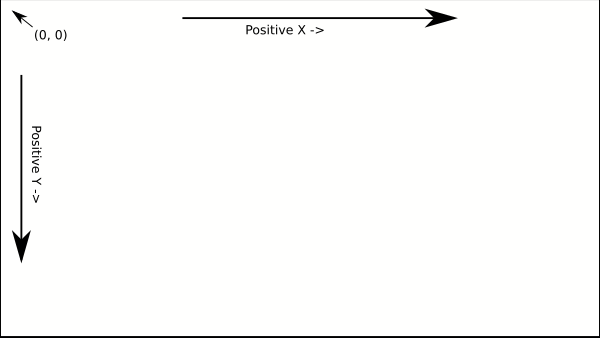
But this isn’t what I want most of the time. I want the origin either in the lower-left corner or dead center. In this case I wanted the origin to be dead center of the window.
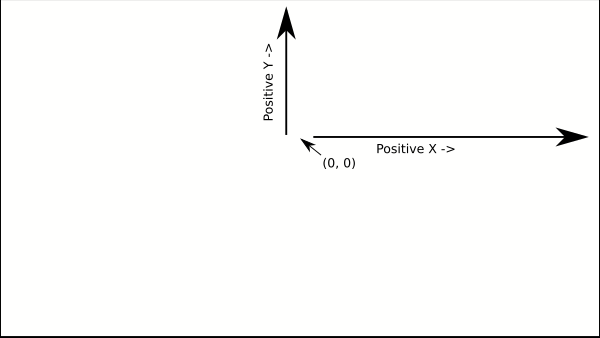
I know I could take every single point I have to deal with–the end points of every line segment, the triangle I’m going to use to draw my Forrest Gump rip-off, the lines illustrating what Forrest “knows”–and use some custom formula to transform those points to a system that when drawn by the program look right.
I spent a lot of time dealing with a Raymond Hettinger mantra: There has to be a better way. And there is. It’s been in wxPython for a while, apparently, and I either never found it or never quite understood how to use it. The magic is in the DC.SetTransformMatrix function.
class MainFrame(wx.Frame):
     def init(self, parent):
         wx.Frame.init(self, parent, size=(600, 600))
         self.Center()
         self.Bind(wx.EVT_PAINT, self.OnPaint)
         self.SetTitle("Runner")

    def OnPaint(self, event):
        self.DrawEverything()

    def DrawEverything(self):
        dc = wx.MemoryDC()
        dc.Clear()
        size_x, size_y = self.GetClientSize()
        dc.SelectObject(wx.Bitmap(size_x, size_y, 32))
        matrix = wx.AffineMatrix2D()
        matrix.Translate(size_x/2, size_y/2)
        matrix.Mirror(wx.VERTICAL)
        dc.SetTransformMatrix(matrix)

        # Draw Stuff to dc here

        win = wx.WindowDC(self)
        win.Blit(0, 0, size_x, size_y, dc, 0, 0)
And lo and behold, when I tell the program to draw a circle at (0,0) with a radius of 50, I get a circle in the middle of the screen. If I draw a rectangle from (0, 0) to to (20, 10), I get a rectangle in the upper-right quadrant of the screen just like I wanted.
There is some odd behavior. I used another matrix to transform the triangle I am using for the runner to rotate it and move it. The particular lines of code feel like they are backwards, but they work.
rm = wx.AffineMatrix2D()
rm.Translate(self.runner.x, self.runner.y)
rm.Rotate(self.runner.d)
points = [(-3, -5), (15, 0), (-3, 5)]
points = [rm.TransformPoint(a, b) for (a, b) in points]
dc.SetPen(wx.BLUE_PEN)
dc.DrawPolygon(points)
dc.DrawLine(points[0], points[1])
I know I should probably draw this sprite in it’s own DC and blit it appropriately, but this was a quick and dirty to get something on the screen solution.
Next, how I tried to relearn linear algebra in an afternoon.