Transforming Shapes
There are several macros available to alter the model’s geometry.
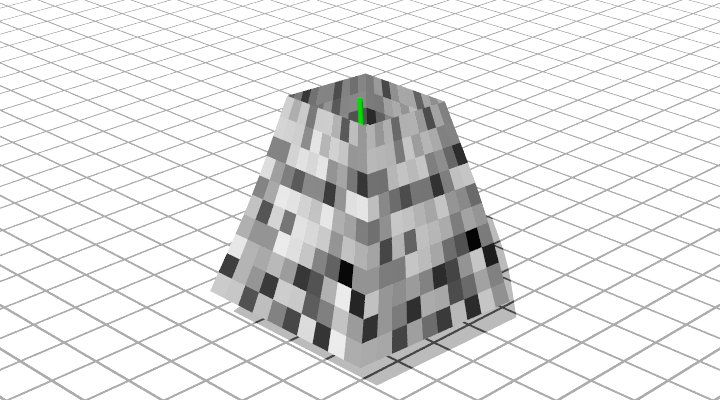
Using a Box Grid, we can scale along the V axis of the shape
#include "bez.inc"

#declare Bez_Texture =
   texture { pigment{ cells scale 0.1 }
             finish { phong 0.1}
           } // end of texture

#declare Spine = array[3] {
    <0.00,  0.00,  0.00>,
    <0.01,  2.00,  0.10>,
    <0.00,  4.00,  0.00> }
#declare EnhancedSpine = ConnectPoints(Spine, 0, 0)


object{DrawConnected(EnhancedSpine, 0.05) pigment { green 1 } finish { phong 1 } }

#declare Box = CreateBoxGrid(Spine, 2, 2, 4, 4, 4, 4)

#declare SBox = Scale_Along_V(Box, 1, 0.5)


DrawPatches(CreateGridControlPoints(ExtractFace(SBox, 0, 3),0), Bez_Texture)
DrawPatches(CreateGridControlPoints(ExtractFace(SBox, 3, 6),0), Bez_Texture)
DrawPatches(CreateGridControlPoints(ExtractFace(SBox, 6, 9),0), Bez_Texture)
DrawPatches(CreateGridControlPoints(ExtractFace(SBox, 9, 12),0), Bez_Texture)
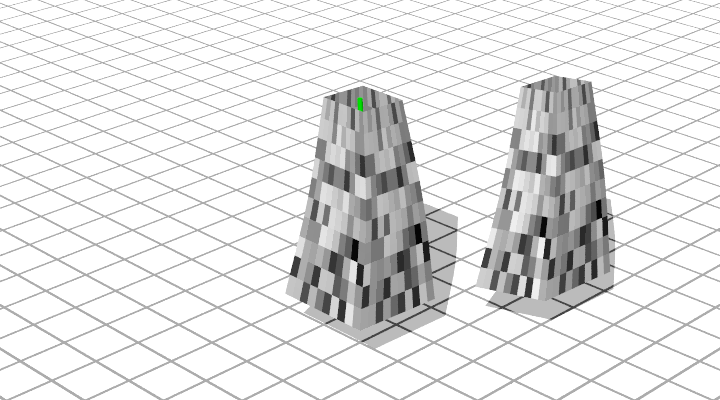
It is possible to move an Array or Grid using the MoveArray() and
MoveGrid() macros.
#include "bez.inc"

#declare Bez_Texture =
   texture { pigment{ cells scale 0.1 }
             finish { phong 0.1}
           } // end of texture

#declare Spine = array[3] {
    <0.00,  0.00,  0.00>,
    <0.01,  2.00,  0.10>,
    <0.00,  4.00,  0.00> }
#declare EnhancedSpine = ConnectPoints(Spine, 0, 0)


object{DrawConnected(EnhancedSpine, 0.05) pigment { green 1 } finish { phong 1 } }

#declare Box = CreateBoxGrid(Spine, 1, 1, 4, 4, 4, 4)

#declare SBox = Scale_Along_V(Box, 1, 0.5)

#declare MBox = MoveGrid(SBox, <2, 0, 3>)


DrawPatches(CreateGridControlPoints(ExtractFace(SBox, 0, 3),0), Bez_Texture)
DrawPatches(CreateGridControlPoints(ExtractFace(SBox, 3, 6),0), Bez_Texture)
DrawPatches(CreateGridControlPoints(ExtractFace(SBox, 6, 9),0), Bez_Texture)
DrawPatches(CreateGridControlPoints(ExtractFace(SBox, 9, 12),0), Bez_Texture)

DrawPatches(CreateGridControlPoints(ExtractFace(MBox, 0, 3),0), Bez_Texture)
DrawPatches(CreateGridControlPoints(ExtractFace(MBox, 3, 6),0), Bez_Texture)
DrawPatches(CreateGridControlPoints(ExtractFace(MBox, 6, 9),0), Bez_Texture)
DrawPatches(CreateGridControlPoints(ExtractFace(MBox, 9, 12),0), Bez_Texture)
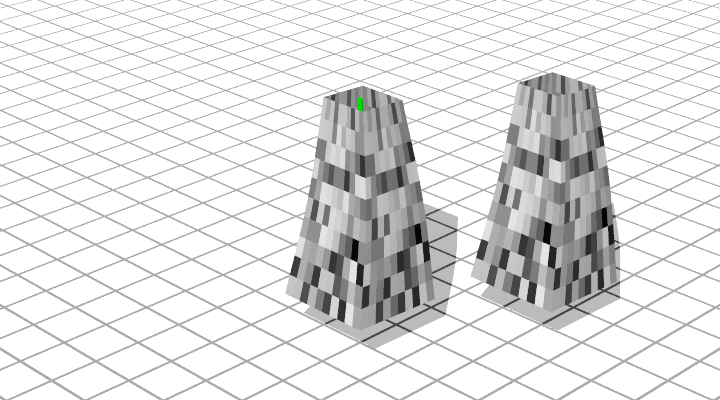
There is also the generic TransformArray() and TransformGrid() macros:
#include "bez.inc"
#include "transforms.inc"

#declare Bez_Texture =
   texture { pigment{ cells scale 0.1 }
             finish { phong 0.1}
           } // end of texture

#declare Spine = array[3] {
    <0.00,  0.00,  0.00>,
    <0.01,  2.00,  0.10>,
    <0.00,  4.00,  0.00> }
#declare EnhancedSpine = ConnectPoints(Spine, 0, 0)


object{DrawConnected(EnhancedSpine, 0.05) pigment { green 1 } finish { phong 1 } }

#declare Box = CreateBoxGrid(Spine, 1, 1, 4, 4, 4, 4)

#declare SBox = Scale_Along_V(Box, 1, 0.5)

#declare TBox = TransformGrid(SBox, Shear_Trans(0.65*x+0.25*z, y, z))

#declare MBox = MoveGrid(TBox, <2, 0, 3>)


DrawPatches(CreateGridControlPoints(ExtractFace(SBox, 0, 3),0), Bez_Texture)
DrawPatches(CreateGridControlPoints(ExtractFace(SBox, 3, 6),0), Bez_Texture)
DrawPatches(CreateGridControlPoints(ExtractFace(SBox, 6, 9),0), Bez_Texture)
DrawPatches(CreateGridControlPoints(ExtractFace(SBox, 9, 12),0), Bez_Texture)


DrawPatches(CreateGridControlPoints(ExtractFace(MBox, 0, 3),0), Bez_Texture)
DrawPatches(CreateGridControlPoints(ExtractFace(MBox, 3, 6),0), Bez_Texture)
DrawPatches(CreateGridControlPoints(ExtractFace(MBox, 6, 9),0), Bez_Texture)
DrawPatches(CreateGridControlPoints(ExtractFace(MBox, 9, 12),0), Bez_Texture)