Creating Cylindrical Shapes
Creating a cylindrical grid follows the same pattern. Create your modeling grid but call
CrateCylindricalControlPoints() instead.
#include "bez.inc"

#declare Bez_Texture =
   texture { pigment{ cells scale <2/pi, 1, 1> *0.1 }
             finish { phong 0.1}
           } // end of texture

#declare CylindricalModel = array[9][4]
#declare ULM = dimension_size(CylindricalModel, 1)-1;
#declare VLM = dimension_size(CylindricalModel, 2)-1;
#for(V, 0, VLM, 1)
  #for(U, 0, ULM, 1)
    #declare _radius = 2;

    #declare _here = <0, Interpolate(V, 0, VLM, 0, 5, 1), -_radius>;
    #declare CylindricalModel[U][V] = vrotate(_here, <0, 360*U/ULM, 0>);
  #end // for Z
#end // for X

#for(V, 0, VLM-1, 1)
  #declare CylindricalModel[ULM][V] = CylindricalModel[0][V];
#end // for Z

#declare CylindrialCPGrid = CreateCylindricalControlPoints(CylindricalModel, 0)

DrawPatches(CylindrialCPGrid, Bez_Texture)
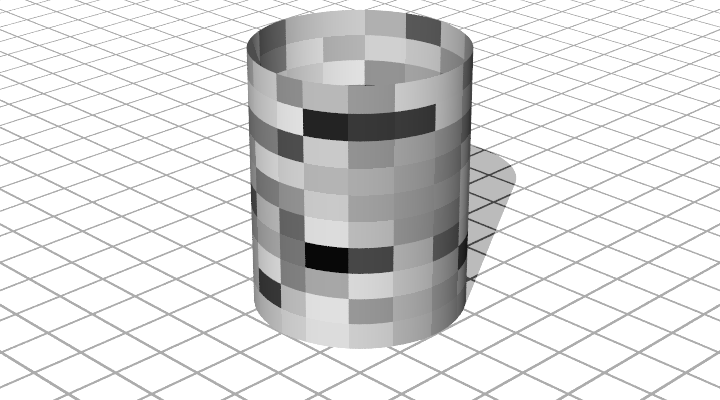
In this model, the U-vector is a single row, and the V-vector is the height of the cylinder. Note that the texture is scaled by 2*pi along the x-axis, which makes the texture look better when mappend onto the control grids.